This project is the result of my knowledge and skills acquired during professional development. Through this work, I want to demonstrate the ability to effectively apply technological solutions to solve specific problems and meet project requirements. With a professional approach and commitment, I strive to create functional and innovative solutions that bring value to users.
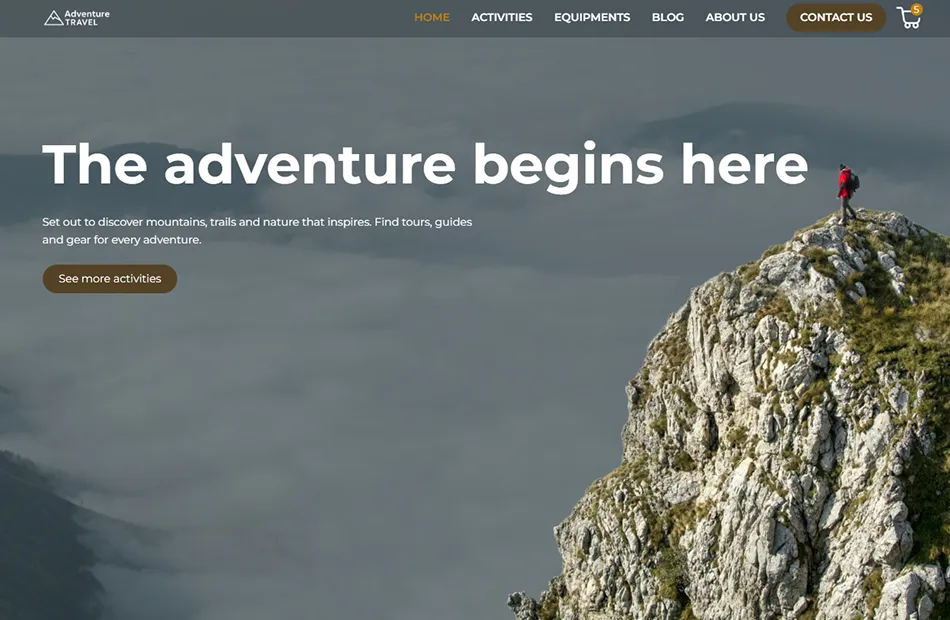
Adventure Travel is a site created entirely in Webflow and designed to showcase the advanced capabilities of this platform. The site uses a CMS system for dynamic content management and interactive animations for improved user experience.
Project year: January 2026
Project Description
Automation & Integrations for this project: I designed and implemented a complete lead-handling automation system that connects Webflow, Make, Airtable, Email, and Telegram into a single, reliable workflow. The goal was to ensure that every inquiry is captured, stored, and followed up automatically — without manual intervention.
Flow: Webflow Form → Make (Webhook trigger) → Airtable → Automated Emails → Telegram Notifications. Every time a user submits a form on the website, the automation is triggered instantly and performs multiple actions in parallel.
What was implemented:
Webhook-based trigger from Webflow:
Each form submission automatically starts the Make scenario. No manual runs or scheduled polling.
Airtable as a central lead database:
All submissions are stored as records. Default lead status is set to New for clear lead tracking. Fields include name, email, activity type, variant, page URL, and submission time.
Immediate confirmation email to the user:
Sent right after form submission. Confirms receipt and reinforces trust.Internal notification systemInstant email notification to the site owner with full lead details. Real-time Telegram message for fast response and mobile alerts.
Delayed follow-up email:
Implemented using Make’s Sleep (delay) tool. Sends a follow-up email to the user after a defined time period. Runs independently without blocking internal notifications.
Email Automation Limitations (Gmail & Outlook)
Challenge: During the setup of automated email responses, I encountered strict security and authentication limitations from major email providers such as Gmail and Outlook. Standard SMTP and legacy authentication methods caused frequent authorization errors and unstable delivery.
Solution: I implemented a modern OAuth-based email connection directly within Make, eliminating legacy SMTP dependencies. This ensured secure authentication, reliable email delivery, and a production-ready setup without additional verification bottlenecks.
Webflow → Airtable Data Consistency
Challenge: Form submissions from Webflow failed to create records in Airtable due to strict validation of single-select fields. Even minor differences in capitalization caused record creation errors and broke the automation flow.
Solution: I standardized form values and aligned them precisely with Airtable’s single-select options. This ensured consistent data mapping and allowed records to be created automatically without manual correction.
Webhook-Based Form Processing
Challenge: Changes in Webflow and Make integrations required switching from deprecated form listeners to webhook-based triggers, which risked breaking the user experience and form success feedback.
Solution: I implemented a webhook-driven workflow that processes form submissions in real time while preserving Webflow’s native success states. This approach ensures both a smooth user experience and reliable backend automation.
I developed a fully custom cart system for this project using Webflow + Vanilla JavaScript, without relying on Webflow Ecommerce. The system stores cart data in localStorage, dynamically renders products from a hidden template, and updates quantities, subtotals, shipping, and total prices in real-time.
Key features include:
1. Add, remove, and update product quantities dynamically,
2. Empty cart state with smooth fade-in animation,
3. Global navbar cart badge synced across pages,
4. Real-time order summary calculation (subtotal, shipping, total),
5. Micro-interactions for plus/minus buttons and badge feedback,
6. Fake checkout modal for demonstration purposes,
7. Responsive and performance-friendly behavior.
This project demonstrates how Webflow can be extended with custom JS to implement complex dynamic functionality while maintaining clean, maintainable code.
.webp)

%202%20(1).png)


.jpg)
%201.jpg)
.jpg)
%20(1).jpg)
.avif)
